Downpay alternative: how Payment Plans compares
Downpay collects a deposit and a balance. Payment Plans runs full merchant-defined installment schedules. Here's the structural difference, and which fits your store.
Downpay alternative: how Payment Plans compares
Downpay and Payment Plans (by PreProduct) both let Shopify merchants collect payment over time without a BNPL lender, but each is built to solve a different problem. Downpay collects a deposit now and the balance later, a two-charge flow. Payment Plans runs a full merchant-defined schedule of automatic installments. Neither is the "better" app in general; one of them is the better fit for what you're actually trying to do.
If you've searched "Downpay app" and landed on a Reddit thread asking whether it's any good, or an agency review page listing its features, you've probably noticed nobody has actually laid out how it compares to a multi-installment alternative. That's what this guide does: explains what each app actually does, what they cost, and which one fits a given order.
Key Takeaways - Downpay is a deposit-and-balance tool: one deposit charge, then the remaining balance collected by auto-charge, invoice, or manual capture. It isn't built for multi-payment schedules. - Payment Plans runs merchant-defined installment schedules, three, six, twelve payments, whatever length the merchant configures, charged automatically from a vaulted card. - Both are merchant-funded: no BNPL lender, no credit check, no third party in the transaction. - Pricing depends entirely on your volume. Downpay's flat monthly tiers can beat Payment Plans' 5% commission at high volume; Payment Plans' 0%-commission plan can beat Downpay's volume caps at high monthly processing. There's no universal cheaper option. - Payment Plans requires Shopify Plus; Downpay does not appear to carry that requirement.
What Downpay actually does
Downpay is a Shopify app built around collecting a deposit on made-to-order, pre-order, or high-value items, then charging the remaining balance later. Its own listing describes the balance side as flexible: "auto-charge cards, send invoices, or collect manually." A card can be stored on file for that later auto-charge, so it isn't purely a manual-invoice tool.
What it isn't, based on the current listing, is a scheduler for a series of installments. The structure is two phases: deposit, then balance. There's no documented option to split the balance itself into several dated charges.
For a merchant who wants "$1,200 charged as one deposit and one balance six weeks later," that's exactly the shape of the problem Downpay solves. For a merchant who wants "$1,200 split into six monthly charges," it isn't.
Downpay's own positioning backs this reading: it's aimed at "custom, made-to-order, and high-value products with lead times", the same high-AOV, delayed-fulfillment territory Payment Plans sits in, approached from a different angle.
Curious how the broader payment-plan landscape breaks down beyond Downpay specifically? See what BNPL providers actually charge merchants for the lender-backed side of the comparison.
What Payment Plans does differently
Payment Plans (by PreProduct) is a Shopify Plus alternative to lender-backed BNPL that runs full merchant-defined installment schedules, not a single deposit-and-balance split. A merchant configures the available payment lengths, for example three, six, or twelve months, and the customer selects one at checkout.
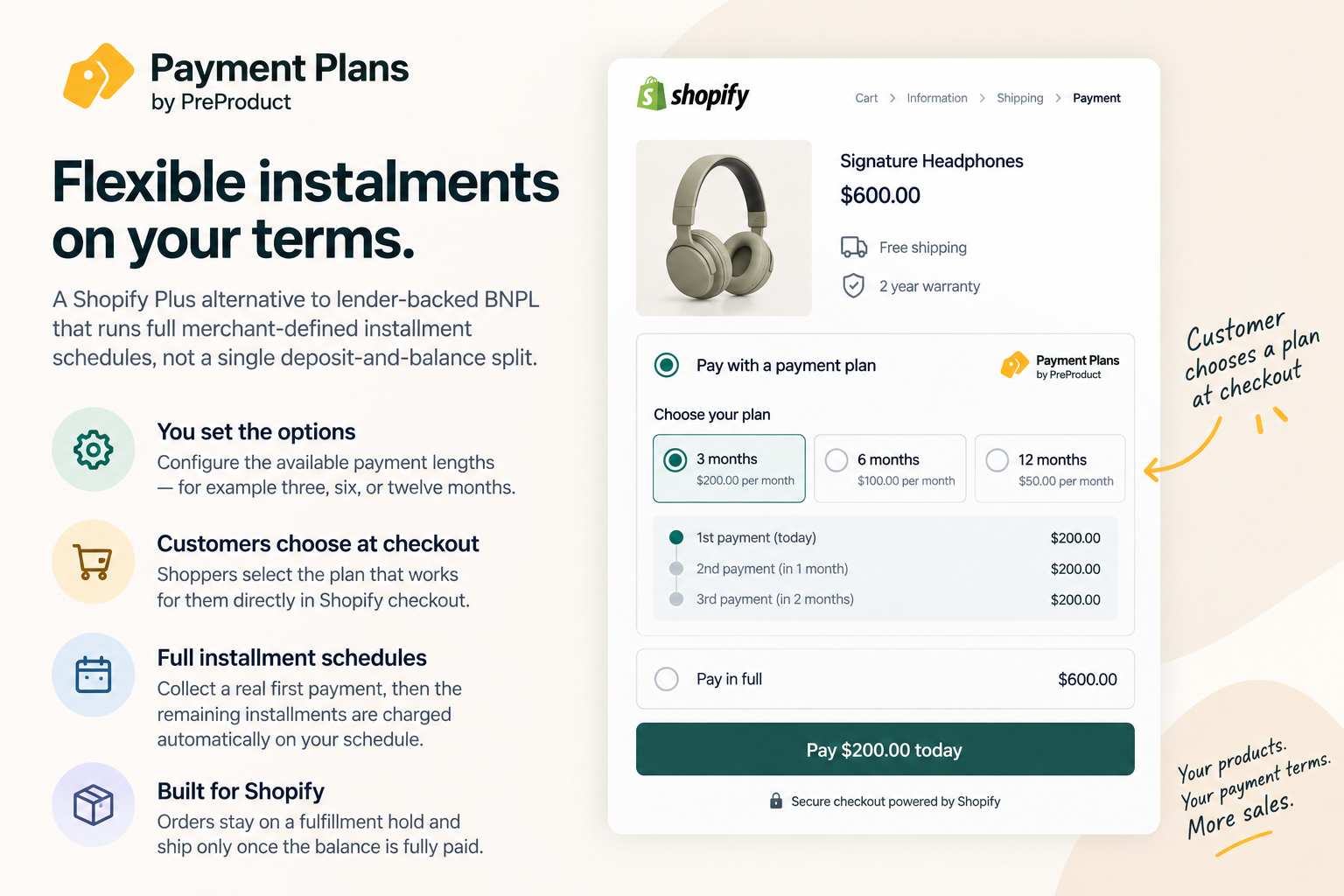
The chronology matters here, because it's where the two apps diverge most. A customer checks out once through Shopify. The first installment is charged immediately, and the card is vaulted securely through supported Shopify payment infrastructure. Every following installment charges automatically on schedule, no manual invoice, no separate action from the merchant.
The order is created in Shopify right away but stays on a fulfillment hold the entire time. Only after the final installment clears does the hold release and the order ship.
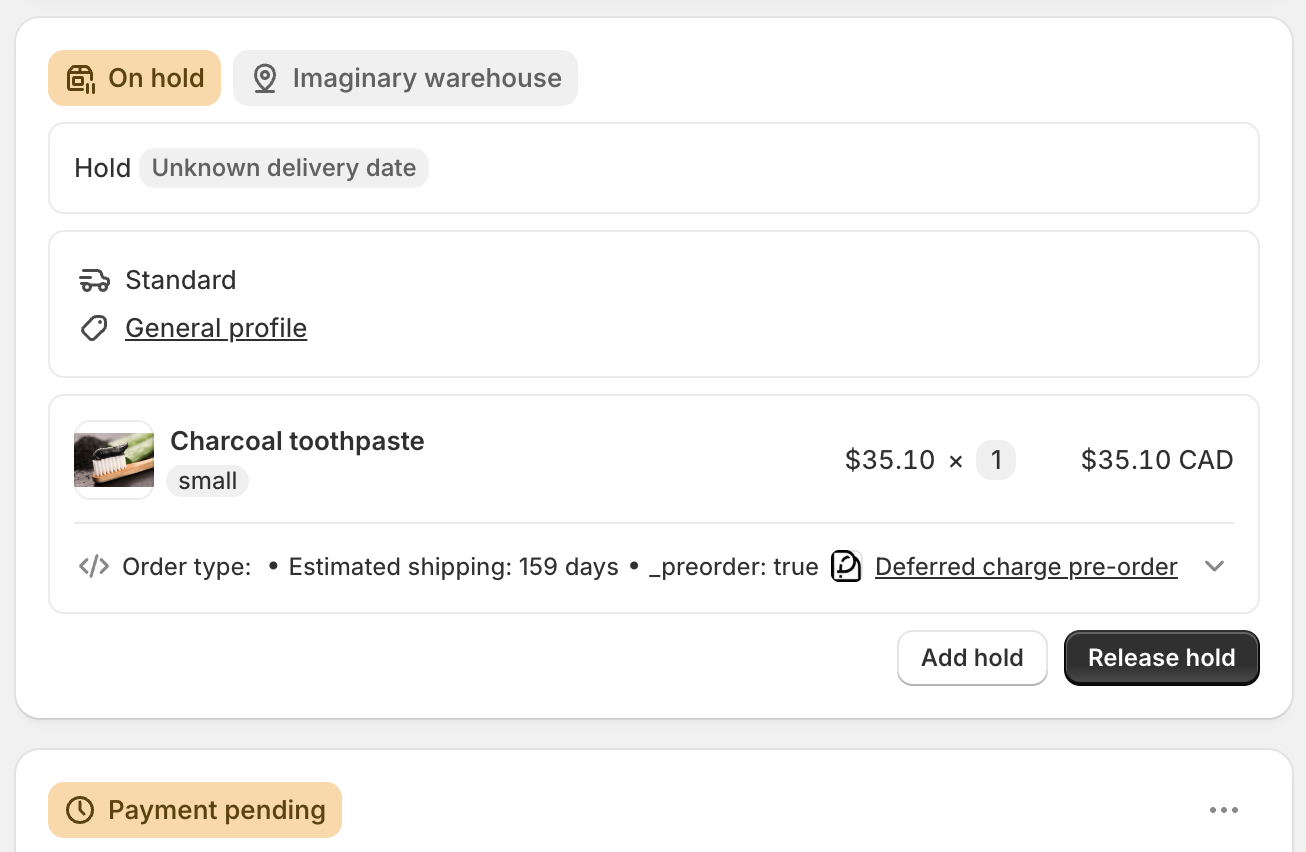
That fulfillment hold is structural, not optional. Nothing ships until the balance hits zero, however many installments that takes.
Want to see the failure-recovery side of that automatic charging? Here's what happens if a customer misses a payment plan installment, the retry sequence, the backup card, and what a merchant is actually exposed to.
A furniture merchant working out which one fits
Take a merchant selling made-to-order sofas at $2,400 average order value, an eight-week production lead time before anything ships. Two customers place orders the same week.

The first wants to reserve their order with a deposit and pay the rest closer to delivery. One charge now, one charge later, nothing more complicated than that. That's Downpay's exact use case: a deposit button on the product page, the balance auto-charged from the card on file once the order's ready to ship.
The second customer can't commit $2,400 in two payments. They want it spread across four monthly charges instead, something they can budget around. That's not a deposit-and-balance problem, it's a schedule problem, and it's what Payment Plans is built to configure: the merchant sets a 4-month option, the customer picks it, and four automatic charges land over the following months while the order sits on hold.
Neither app is wrong for this merchant. The mistake would be trying to force one tool to do the other's job, bolting a workaround onto Downpay to fake multiple charges, or over-configuring Payment Plans for a case that's really just "deposit now, balance later."
Not sure which shape your own catalog needs? See how Payment Plans works to check whether the multi-installment model fits your order values and lead times.
Downpay vs Payment Plans: the comparison
| Dimension | Downpay | Payment Plans |
|---|---|---|
| Payment structure | Deposit, then one balance charge | Merchant-defined schedule of installments |
| Balance collection | Auto-charge, invoice, or manual | Automatic vaulted-card charges on schedule |
| Best fit | Securing an order with a single deposit | Spreading a purchase across several payments |
| Fulfillment hold | Not documented in the current listing | Structural: holds until fully paid, then releases |
| Lender involved | No | No |
| Credit check | No | No |
| Requires Shopify Plus | Not stated | Yes |
| Pricing model | Flat monthly tiers, volume-based | Free + 5% commission, or flat monthly at 0% |
Both apps are merchant-funded. Neither hands the customer relationship, or a cut of every sale, to a BNPL lender. The difference that actually matters when picking one is the payment structure row: how many charges, and whether they're scheduled or a one-time balance.
One caveat worth stating plainly: Downpay's current listing doesn't document a fulfillment-hold feature the way Payment Plans' hold-until-fully-paid mechanic is documented. That may simply mean it isn't advertised as a named feature, not that the app lacks any hold behavior. Verify directly with Downpay if that mechanic matters to your evaluation.
Pricing: it depends on your volume, not a flat answer
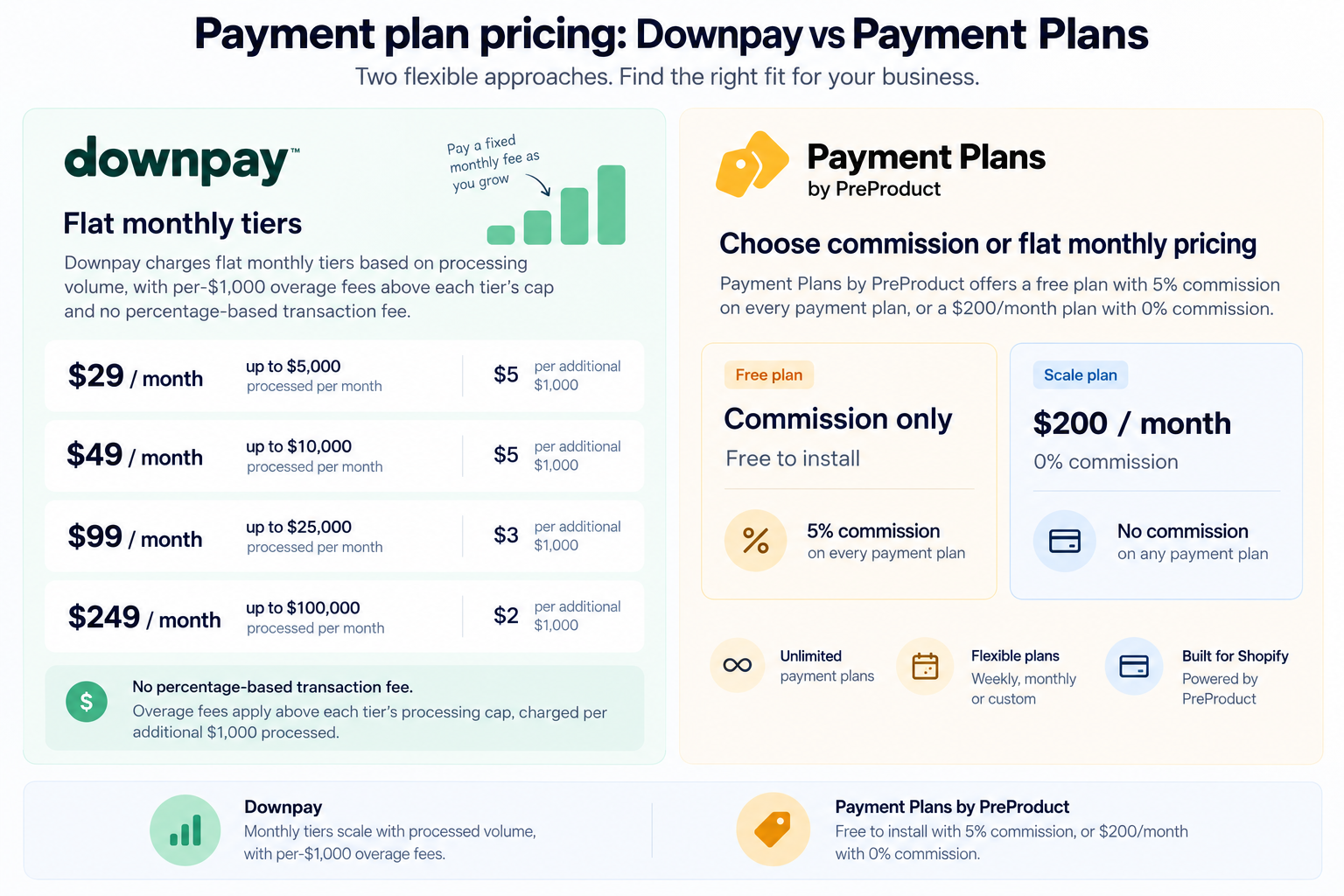
Downpay charges flat monthly tiers based on processing volume: $29/month up to $5,000 processed, up to $249/month for $100,000, with per-$1,000 overage fees above each tier's cap and no percentage-based transaction fee.
Payment Plans offers a free plan at 5% commission on every payment plan, or a $200/month plan at 0% commission.
Before comparing either number, though, check whether price is even the deciding factor. If a customer needs more than one payment after the deposit, Downpay's price doesn't matter, because its deposit-and-balance structure can't do that. The cost comparison below only applies once the payment structure itself is a fit for both apps.
Run the numbers and the cheaper option shifts more than once as volume grows. At /$3,000/month in payment-plan orders, Downpay's Essentials tier ($29) costs less than Payment Plans' 5% commission ($150). At $8,000/month, Downpay's Standard tier ($49) is still the lowest single number on the page, but Payment Plans' $200/month flat plan has by then overtaken the 5% commission plan ($400) as the better Payment Plans option to compare against it.
Keep scaling, and the picture flips. Downpay's overage fees mean its cost keeps climbing with volume, while Payment Plans' flat $200/month doesn't move. Past roughly $65,000/month in payment-plan volume, Payment Plans' flat plan costs less than Downpay's cheapest tier-plus-overage combination, and stays that way as volume climbs further.
The honest takeaway: neither app is the cheaper option at every volume, so don't pick on an assumption. Work out your actual monthly payment-plan volume against both pricing structures, weigh that alongside which payment structure, deposit-and-balance or multi-installment, actually matches what you're selling, and verify current rates on each app's live listing before you commit, since neither figure here is fixed forever.
When a merchant switches from a deposit tool to a schedule
A specialist bike brand had been running Downpay for about a year, using it to collect a 20% deposit on custom builds with a 10-to-12-week lead time. It worked fine for securing the order. The friction showed up on the customer side: a single large balance charge, sometimes $2,000 or more, landing all at once when the bike was ready.

Customer support started fielding the same request on repeat: could the balance be split up instead of hitting all at once? That's a structural limit of a deposit-and-balance model, not a bug, Downpay was doing exactly what it's built to do. The brand added Payment Plans alongside it for orders where a customer wanted the balance itself spread across two or three payments instead of one lump sum, keeping Downpay for simple single-deposit orders and using installment scheduling only where customers actually asked for it.
If your own support queue has that same pattern, it's usually the clearest sign a deposit tool has hit its structural ceiling. Install Payment Plans to add a scheduled option alongside whatever deposit flow you're already running.
Which one fits your store
A few questions settle it faster than a feature list:
- Does the customer need to make more than two payments? If yes, that's Payment Plans' territory. Downpay's model tops out at deposit plus one balance.
- Is the goal just to secure the order before production or shipment? A single deposit is enough for that, and Downpay is built exactly for it.
- Are you on Shopify Plus? Payment Plans requires it. Confirm your plan before evaluating further.
- What's your monthly payment-plan volume? Run it against both pricing tables above rather than assuming either is cheaper by default.
It's fine to run both, as the bike-brand example shows, if your catalog has genuinely different orders that call for each structure.
Frequently asked questions
Is Downpay a BNPL provider? No. Downpay is a merchant-funded deposit and balance-collection tool. There's no third-party lender advancing funds or underwriting the customer, the same structural category Payment Plans sits in, just with a different payment shape.
Can I run multi-installment payment plans with Downpay? Based on its current listing, Downpay's model is deposit plus one balance charge, not a series of scheduled installments. If you need three, six, or more automatic charges, that's what Payment Plans is built for.
Does Payment Plans require Shopify Plus? Yes. Payment Plans (by PreProduct) is built for Shopify Plus merchants. Downpay's listing doesn't state that requirement, so confirm current eligibility directly with each app before deciding.
What happens if a customer misses an installment on Payment Plans? Failed charges can be retried automatically and a backup vaulted card may be charged where one's on file. See the full recovery sequence for exactly how that plays out and what it costs if a plan can't be recovered.
Is Payment Plans more expensive than Downpay? It depends entirely on your monthly payment-plan volume. Downpay's flat tiers can be cheaper at lower volumes; Payment Plans' 0%-commission plan can be cheaper at higher volumes. Compare both pricing tables against your own numbers rather than assuming either wins by default.
The bottom line
Downpay and Payment Plans solve two different problems that happen to share a lot of surface area: both merchant-funded, both aimed at high-AOV and made-to-order products, both keeping the customer relationship with the merchant instead of a lender. The difference is the payment structure. Downpay collects a deposit and a balance. Payment Plans runs a full schedule of installments the merchant defines.
Pick based on what your customer actually needs to pay: one deposit and one later charge, or several payments spread out over months. And don't assume either app is the cheaper option until you've run your own volume against both pricing tables, because the honest answer is that it depends.
If your catalog needs scheduled installments rather than a single deposit, see how Payment Plans works for Shopify Plus or install it from the Shopify App Store to compare it directly against what you're running today.
Get started today
Ready to Bring Payment Plans In-House?
Join the first 50 Shopify Plus merchants to lock in founding pricing.
Try for free →