Shopify partial payments: native options vs apps
Shopify partial payments are Plus-only and collected by hand. Here's what Shopify does natively, what needs an app, and which route fits a high-ticket store.
Shopify partial payments: native options vs apps
Shopify does support partial payments natively, but only on Shopify Plus, only on draft orders with payment terms, and you collect or record every payment yourself. Nothing in the native flow charges your customer on a schedule for you. If you want that, you need an app.
This guide separates the three different things people mean by "partial payments," shows what Shopify does natively for each, and helps you decide when a manual approach is enough and when it isn't. We build Payment Plans (by PreProduct), so we'll also show where a scheduled plan fits. We'll be just as clear about where it doesn't.

Key Takeaways - Shopify's native partial payments are available on Shopify Plus only, and work on draft orders with payment terms. - Every native payment is something you collect or record yourself. Shopify's help pages describe no scheduled or automatic later charge. - "Partial payments" can mean recording a payment, taking a deposit, or running a schedule of installments. Each needs a different tool. - Splitting one order across two cards (split tender) is a different problem from paying an order off over time. - If you'd ship before the balance is paid, you carry the risk of an unpaid balance. For regular purchases, keep fulfillment on hold until the order is fully paid.
What "partial payments" means on Shopify
Three different mechanisms hide behind the same phrase. Knowing which one you need saves you from comparing tools that solve different problems.
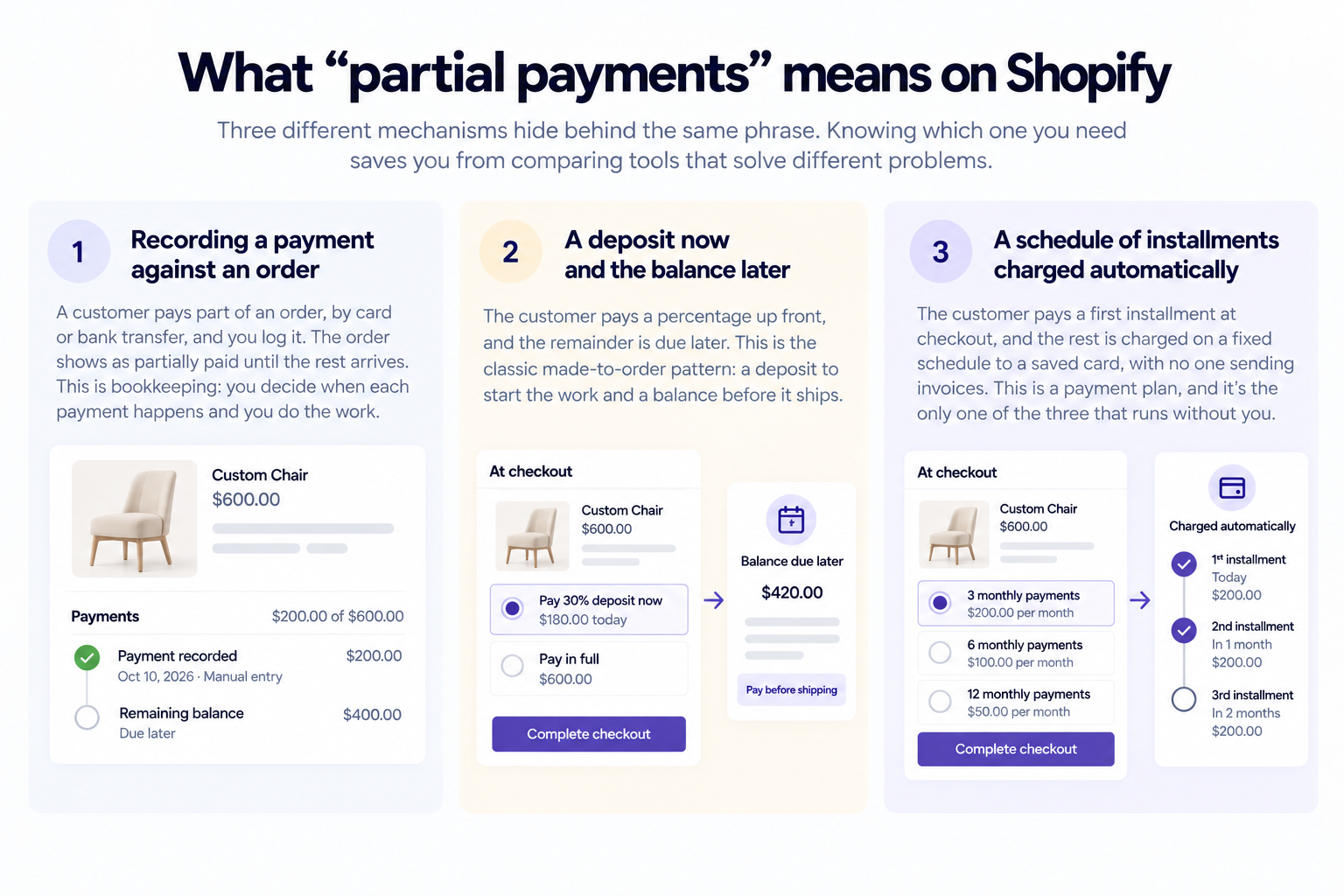
1. Recording a payment against an order
A customer pays part of an order, by card or bank transfer, and you log it. The order shows as partially paid until the rest arrives. This is bookkeeping: you decide when each payment happens and you do the work.
2. A deposit now and the balance later
The customer pays a percentage up front, and the remainder is due later. This is the classic made-to-order pattern: a deposit to start the work and a balance before it ships.
3. A schedule of installments charged automatically
The customer pays a first installment at checkout, and the rest is charged on a fixed schedule to a saved card, with no one sending invoices. This is a payment plan, and it's the only one of the three that runs without you.
What partial payments are not: split tender
If your search was really "how do I let a customer pay one order with two cards," that's split tender, and it's a different feature. It splits one payment across payment methods at the same moment. A partial payment spreads one order's payments across time. This article covers the second.
Shopify partial payments: what's native
Shopify's own help pages are clear about the limits, which is why we'll quote them closely. We checked each of these on October 28, 2026. Shopify changes help pages, so check them again before you build a process around them.
Partial payments on draft orders with payment terms
Shopify lets you "collect and record multiple partial payments for orders with payment terms". Three details matter:
- It requires Shopify Plus. The page says the feature is available to stores on the Shopify Plus plan.
- It applies to draft orders created with payment terms. You pick the payment method when you record each payment, not when you create the draft.
- Card options are narrower than you'd expect. A vaulted card is available for B2B customers only, tied to company locations. Otherwise you enter a new card or record a manual payment such as a bank deposit. Shopify notes that manual payments aren't captured by Shopify.
After you record a partial payment, the order's status changes to Partially paid.

Deposit requirements on payment terms
Shopify also lets you require a deposit as part of payment terms, set on a company location, a whole company, or an individual draft order. Deposit requirements are available only on Shopify Plus. Once the deposit is captured, the order shows as Partially paid. If the customer pays the deposit with a manual method, it stays at Payment pending until you record it.
Collecting the balance on a deferred order
For an order with an outstanding balance, Shopify's deferred payments page gives you three ways to collect: send the customer an invoice, charge their card, or mark the order as paid when you've been paid outside Shopify. Charging a card requires Shopify Payments. Payment reminders go out as scheduled emails, and an unpaid order flips to Overdue after its due date.
What's missing
Each payment is something you trigger. You send the invoice, you click charge, or you record the payment. Shopify's help pages describe no schedule that charges a customer's saved card on a set day without you.
That isn't a flaw. It's a design for hands-on, relationship-driven selling, which suits B2B accounts well. It just isn't automatic.
| Route | Plan needed | Who triggers each payment |
|---|---|---|
| Record partial payments on a draft order with payment terms | Shopify Plus | You, from the order |
| Deposit requirement on payment terms | Shopify Plus | The customer pays the deposit on the invoice; you collect the balance |
| Invoice, charge a card, or mark as paid on a deferred order | Not stated on Shopify's page | You |
| Scheduled installments through an app | Depends on the app | The app, automatically |
When a manual approach is enough
Don't buy software you don't need. Manual partial payments are a reasonable fit when:
- You take a handful of custom or B2B orders a month and know each customer personally.
- Your customers expect an invoice and a bank transfer, not a card on file.
- You're comfortable chasing a late payment yourself.
Here's an illustrative case, not a real customer. A cabinetmaker takes six large orders a month, each with a 30% deposit and a balance due before delivery. She sends each invoice by hand and records each payment. At that volume, it takes an hour or two a week, and the personal touch is part of the service.

Now scale it. At sixty orders a month, with balances due on different days, the same process turns into a part-time job. A missed reminder becomes a late shipment, or a shipment before the money arrived.
Want to see what automatic charging looks like? Read how to set up your first payment plan to see the checkout and the schedule end to end.
Deposit apps vs scheduled installments
Once you decide you want something automated, you're choosing between two shapes of plan.
Deposit-and-balance apps
A deposit app collects a percentage at checkout and charges the balance later, often to a stored card. It's a two-phase model, and it fits made-to-order and custom products well, where "pay to start, pay to finish" matches how the work happens. Several of these exist, and they differ on whether the balance charges automatically or relies on an emailed payment link, so check that before you choose. We compare one of them in detail in our Downpay comparison.
Scheduled payment plans
A payment plan splits the price into several installments on a schedule you set. The customer pays the first installment at checkout, and the app charges the rest automatically to the card saved on the order.
With Payment Plans, the first installment, the down payment, is always taken at checkout. There's no option for nothing to pay today. You can set it as an equal share, a percentage, or a fixed amount, as the down payments docs explain.
A plan can run from 2 to 15 installments, counting the down payment. So a two-installment plan is a deposit plus one balance. A six-installment plan is a deposit plus five more.
How a scheduled plan works, step by step
Here's the money flow and the goods flow side by side, using a $1,200 product and six monthly installments. It ignores tax, shipping, discounts, and failures to keep the numbers clean.
- At checkout: the customer chooses six installments through Shopify checkout and pays the first $200 immediately.
- Card saved: the payment method is saved on the order through Shopify's payment mandates, so later installments don't need the customer to come back.
- Each month: the app charges another $200 automatically. You're paid as each installment succeeds.
- Fulfillment hold: the order was created in Shopify at checkout and placed on a fulfillment hold. By default, it stays on hold while payments are outstanding.
- After the sixth installment: the plan is fully paid, the hold is released, and you ship.
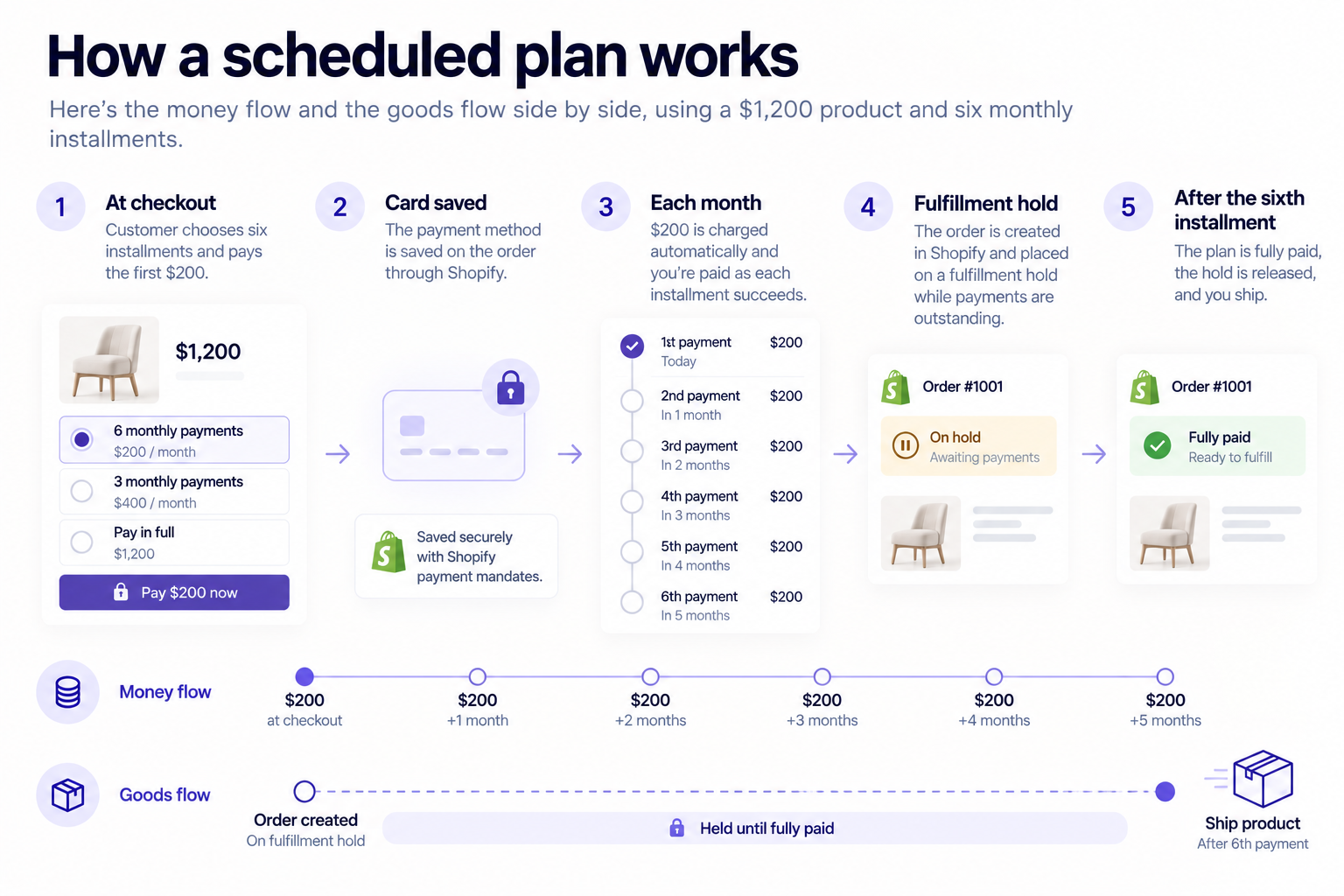
If the plan has just two installments, steps three and five collapse: $600 at checkout, $600 a month later, then ship. Same mechanics, shorter schedule.
What this model costs you
The honest tradeoff is the point of the model. You get paid over time, not upfront, so your cash flow needs the margin to wait. And by default, nothing ships until the plan is fully paid, so your stock sits allocated until then. If either of those is an issue, a payment plan isn't the right tool.
No lender advances you the full order value. That's the structural difference from buy now, pay later (BNPL), and it's also the cost.
Shipping before the balance is paid
Merchants can choose to release the hold straight away, in Settings > Fulfillment, and ship while installments keep charging. That suits rentals, lease-to-own, and large equipment sold under a signed agreement.
In that setup, you carry the risk of any unpaid installments, because there's no lender behind the plan. For regular purchases, keep the default hold. The fulfillment holds docs walk through the setting.
An illustrative example
Picture a leather goods brand, again hypothetical, selling a $1,800 handmade bag. It offers a plan with a maximum of three installments.

A customer who picks three pays $600 at checkout and $600 on each of the next two charge dates. The bag is cut and stitched during that window. It ships when the last $600 clears. The brand never sent an invoice, and as long as each charge succeeds, it never has to chase a payment.
Where partial payments go wrong
Every version of partial payments shares the same three risks. Know them before you pick a route.
Failed charges
A card gets declined, expires, or the bank asks for authentication. Manual routes leave the follow-up to you. A scheduled plan can retry and fall back to an invoice, but it won't recover every payment. Our guide to what happens when a customer misses an installment lays out the recovery sequence and the real exposure.
Cash flow
Whichever route you take, the money arrives in pieces. If you front materials or labor, work out when your costs land versus when the installments do. The longer the schedule, the longer you wait, so size it to your margin, not to the biggest number the app allows.
Cancellations and refunds
Decide your policy before the first customer asks. What happens to the deposit if someone cancels at installment three? Our refunds and cancellations docs explain how the app handles it, and you should confirm that your terms and disclosures meet the rules that apply to your business, since payment-plan and refund rules vary by jurisdiction.
Which route fits your store
Use the list below as a first filter.
- Stay manual if you take few, high-touch orders and want to control every invoice. Native partial payments on a Plus draft order are built for exactly this.
- Use a deposit app if your model is "pay to start, pay to finish" and one balance payment is enough.
- Use a scheduled plan if you sell high-ticket products where spreading the price across several installments helps customers commit, and you want the charges to run without you. See the wider landscape in our alternatives to buy now, pay later and the Shopify payment plans pillar guide.
Who this isn't for
Payment Plans is built for Shopify Plus stores. Development and partner stores can install it for testing. If you're not on Plus, it isn't the right fit for you today.
It's also a poor fit if you need the full order value upfront, if you'd ship regular orders before they're paid with no agreement in place, or if you can't hold stock until a plan completes. For those stores, a lender-backed option or standard checkout is the more honest answer.
Frequently asked questions
Can I take partial payments on Shopify without Shopify Plus?
Shopify's own pages describe native partial payments and deposit requirements as Shopify Plus features. On other plans, the native options we verified are the deferred-payment tools: send an invoice, charge a card, or mark an order as paid. For automatic installments you need an app, and each app sets its own plan requirements, so check the listing. Payment Plans itself is built for Shopify Plus stores.
Does Shopify charge the remaining balance automatically?
Not according to Shopify's help pages for partial payments, payment terms, and deferred payments. Each describes the merchant sending an invoice, charging a card, or recording a payment. Payment reminders are scheduled emails, not automatic charges.
Is a deposit the same as a payment plan?
No. A deposit is one payment now and one balance later. A payment plan splits the price across a schedule of installments. A two-installment plan behaves like a deposit and balance, but a deposit-only tool can't run a six-month schedule.
When does the customer receive the product?
With Payment Plans, by default, after the final installment. The order sits on a fulfillment hold until it's fully paid. Merchants can release it straight away instead, but then they carry the risk of unpaid installments, so we recommend it only for rentals and big-ticket sales under a contract.
Can a payment plan be just a deposit and one balance?
Yes. Set the maximum number of installments to 2. The customer pays the down payment at checkout and the balance on the next charge date, and the order ships once it's paid.
Is this the same as Shop Pay Installments?
No. Shop Pay Installments is a lender-backed option inside Shopify Payments, where a provider pays you and collects from the customer. Partial payments and payment plans have the customer paying you directly. We cover the eligibility rules in our Shop Pay Installments guide.
The bottom line
Shopify partial payments exist, but they're a Plus-only, hands-on toolkit: draft orders with payment terms, deposit requirements, and a handful of ways to collect the balance. That's a good fit when you take a few high-touch orders and want to control each one.
When volume grows, or you want customers to pay on a schedule without anyone sending invoices, you've moved from partial payments to a payment plan. That's the point to look at an app, and to be honest about the tradeoff: you're paid over time, and by default the order ships once it's fully paid.
If you run a Shopify Plus store and sell high-ticket products, see whether Payment Plans fits your store, or explore Payment Plans for Shopify Plus.
Payment Plans does not provide a loan or perform a credit check. Merchants should confirm that their payment-plan terms, disclosures, cancellation policy, and local setup meet the requirements that apply to their business.
Get started today
Ready to Bring Payment Plans In-House?
Join the first 50 Shopify Plus merchants to lock in founding pricing.
Try for free →